
Free tool · runs in your browser
Skin Analysis
Four maps drawn over your own photo: where the skin reads warmer, where darker marks sit, where fine detail shows and where light bounces off. Each map is scaled to your own face in this photo, so it shows where a quality is stronger than your own average, not how you compare with anyone else. Computed on your device. Nothing is uploaded.
Drop a photo, paste one, or choose a file
Straight-on, no make-up if you can, soft even light, face filling the frame. JPG, PNG or WebP.
Runs in your browser. Your photo never leaves your device.
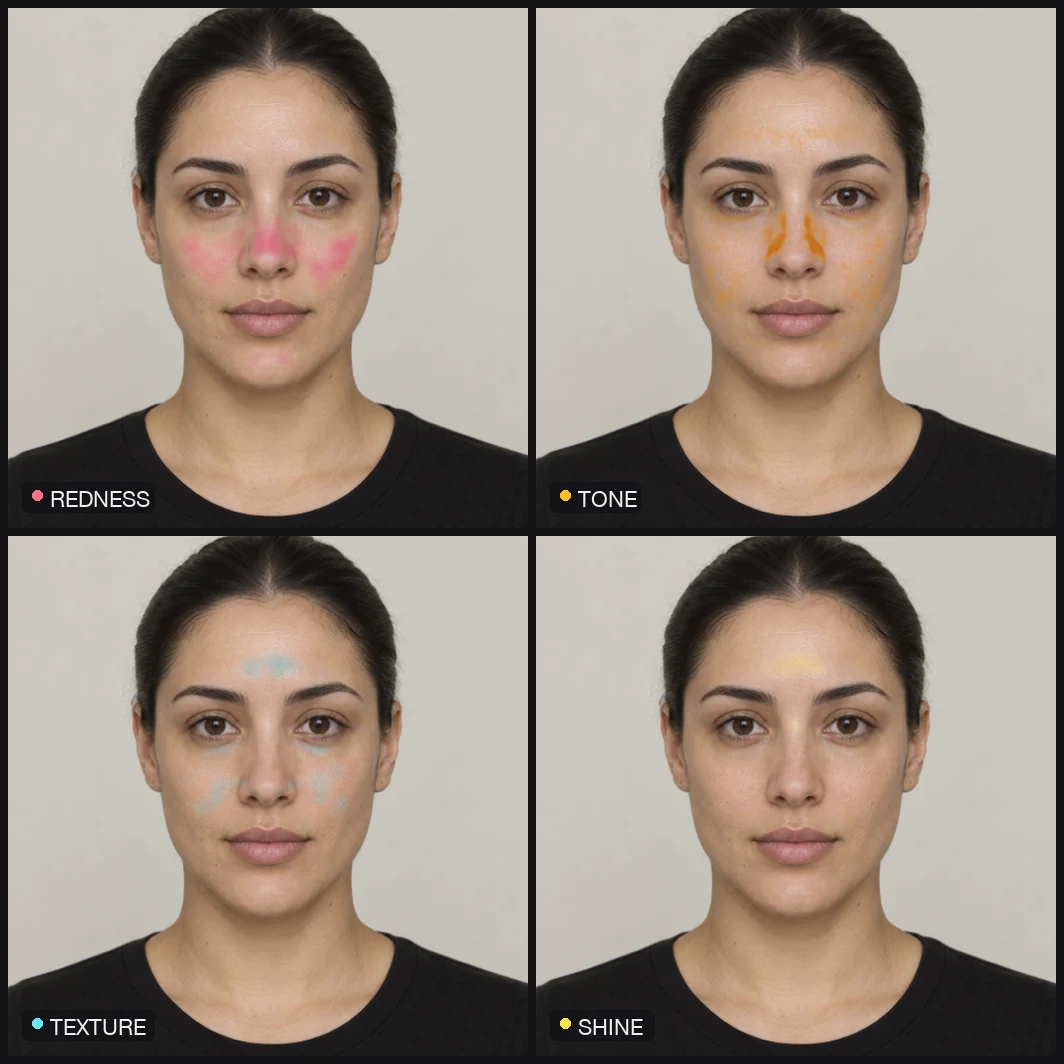 Example
How the map is made
Your own face is the baseline.
The photo is scaled to 720 px, 478 landmarks find the face, and a skin mask is cut from the face outline with the eyes, brows, lips and nostrils removed and anything much darker than the cheeks (hair, stubble, deep shadow) dropped. Colours are converted to CIELAB so lightness and hue can be read separately. Each map subtracts the median of your own skin and divides by its spread, so the colour scale means the same thing on every face: how far a patch sits above your own typical value.
- Redness
- Reads warmth, the a* channel of CIELAB, against your own median. Most sensitive to skin that is warmer than the rest of your face, whether that is flushing, the sides of the nose or a patch that catches more blood flow.
- Tone
- Reads darker, compact marks against a local baseline of the skin around them, with a chroma term that discounts plain shadow. Most sensitive to small dark spots, not to the overall depth of your skin colour, which is the baseline.
- Texture
- Reads fine detail: how much the brightness changes at the scale of a few pixels, averaged locally. Most sensitive to pores, stubble, fine lines and anything else that breaks a smooth surface. Sharp light and a sharp lens raise it.
- Shine
- Reads light bouncing off the surface: pixels brighter than your median that also lose colour towards white. Most sensitive to specular highlights on the forehead, nose and cheekbones, and partly to where the light was.
What this is and isn't
A map of a photo, not a diagnosis.
This is a cosmetic observation of your skin as it appears in one photo. It is not a dermatologist and it does not try to be one: it names no conditions, grades no severity and gives no treatment advice. It shows where four surface qualities concentrate relative to your own face, which is useful for seeing your skin as a camera sees it and for comparing two photos taken the same way.
A clinic VISIA booth photographs under controlled polarised and UV light in a fixed head rest; a selfie under whatever light you have cannot match that, so treat these maps as selfie-grade. If a spot is new, changing, bleeding, painful or simply worrying you, see a clinician rather than a map.
Sources
What this is based on.
The measurement and its reference ranges come from published research. Studies use different methods and populations, so compare your number with the range shown on this page rather than with other tools.
- 1.
Fink B, Grammer K, Matts PJ (2006). Visible skin color distribution plays a role in the perception of age, attractiveness, and health in female faces. Evolution and Human Behavior. doi:10.1016/j.evolhumbehav.2006.08.007
More even skin colour made faces look younger, healthier and more attractive.
- 2.
Chardon A, Cretois I, Hourseau C (1991). Skin colour typology and suntanning pathways. International Journal of Cosmetic Science. PubMed 19291061
Introduced the individual typology angle (ITA°), a standard way to describe skin colour.
- 3.
Kartynnik Y, Ablavatski A, Grishchenko I, Grundmann M (2019). Real-time facial surface geometry from monocular video on mobile GPUs. arXiv. arXiv:1907.06724
The face-mesh model that places the 468 surface landmarks this tool measures from.
- 4.
Ablavatski A, Vakunov A, Grishchenko I, et al. (2020). Real-time pupil tracking from monocular video for digital puppetry. arXiv. arXiv:2006.11341
The iris model that adds 10 eye landmarks (478 in total), used for pupil-based reference lines.
Our own data: how much each reading moves when the same face is photographed again is published on the methodology page. How we choose sources.
FAQ
Is my photo uploaded?+
No. The face landmarks, the colour conversion and the four maps are computed in your browser. Nothing leaves your device, there is no account and no server receives the image.
What does "Hide my face" do?+
It swaps the photo for a flat silhouette built from your face outline and keeps the map on top. Use it when you want to save or share the map without the photo. The map itself is unchanged.
Why does lighting matter so much?+
All four maps read the light that reached the camera. A warm lamp raises redness everywhere, side light adds shadow that can pass as texture, and a window in front of you adds shine. The maps are relative to your own face in the same photo, which removes most of a uniform shift, but they cannot remove uneven light. Soft, even light facing you gives the cleanest read, and only photos taken the same way are worth comparing.
Why does the tone map not flag my whole face?+
Because it reads against a local baseline of your own skin, not against a fixed colour. A darker or lighter complexion is the baseline, not a mark. Only patches darker than the skin around them show.
Is this a skin condition test?+
No. It is a cosmetic observation of the surface as photographed. It does not name conditions and does not grade severity. If something on your skin worries you, is changing, or is not going away, see a clinician.
Related tools
Four maps here.
Nineteen readings in the app.
A controlled scan, skin texture and skin quality scored alongside the rest, rescans to compare against, and a 3D model on Face ID iPhones.